🔥 Just Launched Free Chrome Extension live — build guides visually on any site. No code, no subscriptions. Add to Chrome — Free →
Drop-in JS Plugin · Free Chrome Extension · No Backend Required

Your users are
lost — FlowAssist
guides them home.

A single script tag that adds guided tours, onboarding flows, and click automation to any web app. Now with a free Chrome Extension to build guides visually on any site — no coding needed.

For Demo or Support, active team available: care@scaleflow.in
No monthly fees · Instant download · Works with any stack · Free Chrome Extension
10+hrs / week saved
60%fewer support tickets
5 minto production
0dependencies
app.yourproduct.com/onboarding
● FlowAssist Active
User Registration
Done
Company Details
Done
Email Verification
Live
4
Roles & Permissions
Next
Click Verify Email to confirm your account and unlock all features.
No subscriptions, ever
Free Chrome Extension
5-min integration
Zero dependencies
React, Vue, Angular, Vanilla
Chrome Extension New

Build guides visually.
No code needed.

The FlowAssist Chrome Extension lets you point-and-click to build multi-step automation flows on any website. Generates stable selectors automatically. Free forever.

🎯
Smart Element Picker
Click any element — FlowAssist scores and picks the most stable selector automatically.
Visual Flow Builder
String actions together — click, fill, scroll, wait — then replay with one click.
🌐
Works on Any Website
Site-agnostic. All flows stored locally in your browser. Nothing sent to any server.
📤
Export as JSON
Export your flows and drop them directly into the JS plugin config. Build visually, ship in code.
FlowAssist Builder & Runner
My Guide — 4 Steps
1
Click "Settings" tab #nav-settings
2
Fill workspace name .workspace-input
3
Click "Save Changes" button[type=submit]
4
Wait for toast message .toast-success
+ Add Step
Export JSON
Free Public Library

Try live guides on real sites.
No sign-up needed.

Our public guide library has ready-to-run flows for popular web apps. Install the Chrome Extension, visit any site below, and run a guide instantly for free.

Free
📊
Google Analytics Tour
Guided walkthrough of GA4's key reports, audience segments, and conversion tracking.
Run guide →
Free
🎨
Figma Onboarding Flow
Step-by-step guide to creating your first frame, component, and auto-layout in Figma.
Run guide →
Free
🗂️
Notion Setup Guide
Build your first Notion workspace with databases, templates, and linked views.
Run guide →
Free
📧
Gmail Automation Tour
Learn filters, labels, and canned responses to hit inbox zero faster.
Run guide →
Why SaaS teams ship FlowAssist first
0%
Support Tickets
0×
User Activation
0 min
Integration Time
$0 /mo
No Subscriptions

Watch FlowAssist
transform user flows.

Real-world examples showing how FlowAssist guides users through complex interfaces with zero friction.

Getting Started Guide

Integrate FlowAssist into your app in under 5 minutes with this quick setup tutorial.

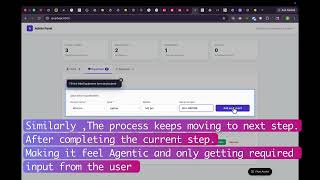
Navigate Autopilot Demo

Automatic click-through guides eliminate "Where do I click?" support tickets completely.

Splash Onboarding Flows

Build beautiful multi-step wizards that capture user intent before they dive into your product.

Advanced Features & API

Custom hooks, conditional logic, and integration with your backend systems.

Onboarding Experience

Seamless onboarding journeys that guide users from zero to value instantly.

Everything you need
in one script tag.

No npm, no build tools, no subscriptions. Works with React, Vue, Angular, or plain HTML.

01 — Splash Onboarding

Capture intent before users dive in

Full-screen wizard collects goals, preferences, and setup choices. Animated progress, tile selection, skip logic, and API hooks — zero backend.

Multi-StepAPI HooksSkip Logic
Step 1 of 3
What's your main goal?
🚀
Launch
📈
Grow
🔧
Build
Continue →
02 — Navigate Autopilot

Auto-click any element in your UI

FlowAssist clicks through your interface automatically. Waits for elements, fires events, and guides users step-by-step. No more "Where do I click?" tickets.

Click AutomationSmart WaitProceedOn
↑ Click here to open your workspace settings
03 — Interactive Tour

Let users explore at their pace

Feature tours with Prev/Next controls, progress dots, and highlight rings. Users move through your UI on their own terms — perfect for complex dashboards.

Self-PacedHighlight RingsProgress Dots
This is your workspace — manage all projects here.
04 — Survey & NPS

Capture feedback at the right moment

Beautiful in-app surveys with star ratings, NPS scales, and open text. Responses persist on reload and POST to your API. Get feedback when users are engaged.

NPS ScaleStar RatingsAPI Export
How satisfied are you with onboarding?
⭐⭐⭐⭐
Not satisfiedVery satisfied
1
2
3
4
5
6
7
8
9
10

Stop burning $3,600/year
on tools you don't need.

Same capabilities as the enterprise giants — for a single one-time payment.

Average customer saves$3,531in year one alone
Feature FlowAssist Appcues Intercom Userflow
Guided Tours
Onboarding FlowsPartial
Click Automation
NPS & SurveysAdd-on
Free Chrome Extension
Visual No-Code Builder
No Backend Required
Zero Dependencies
Vendor Lock-inNone — your codeHighHighHigh
Annual Price $49one-time, forever $249–$1,249per month $74–$374per month $300+per month
Get FlowAssist for $49 — Save $3,500+ vs alternatives

Production ready
in 5 minutes flat.

1
📦
Drop in
two files

Add navigateme.js and the stylesheet. No npm, no build step. Works with React, Vue, vanilla JS — everything.

2
⚙️
Define
your guides

Set window.navigateme_guides with selectors, messages, and API hooks. Or export them from the Chrome Extension.

3
🚀
Ship &
iterate

Users see the launcher. Guides auto-resume from sessionStorage. Update anytime — no redeploys needed.

index.html — setup in 8 lines
// 1. Add script tag to <head>
<script src="navigateme.js"></script>
 
// 2. Define your guides (or export from Chrome Extension)
window.navigateme_guides = [{
  id: "onboarding",
  type: "navigate",
  steps: [{ selector: "#verify-btn", message: "Click here first" }]
}]
 
// That's it. FlowAssist handles the rest. ✓

Got questions?
We've got answers.

Yes, completely free forever. The FlowAssist Builder & Runner extension lets you build and replay flows on any site, store them locally in your browser, and export them as JSON. The $49 JS plugin is the embeddable SDK you ship inside your own product.

The public library is a growing collection of free, community-contributed guides for popular web apps. Install the Chrome Extension, head to flowassist.online/library, pick a site, and run the guide. No sign-up or purchase needed — it's our way of letting you experience FlowAssist before buying.

Yes, completely. FlowAssist stores guide state in sessionStorage. Survey responses can optionally be POSTed to your own API endpoint — but you don't need any server-side code for the guides, tours, or onboarding flows to work perfectly.

Absolutely. FlowAssist is framework-agnostic. It uses standard DOM APIs and a smart selector engine that handles dynamically rendered elements. It works with React, Vue, Angular, Svelte, and plain HTML — no extra config needed.

You pay once and own the files forever. There are no monthly fees, no seat licenses, no usage limits. You can use FlowAssist on as many projects as your license tier allows, forever, with no additional cost. Future updates included.

FlowAssist covers the core use cases that most teams actually use. Appcues and Intercom charge $249–$1,249/month and require backend integrations. FlowAssist costs $49 total, has zero dependencies, works offline, and comes with a free Chrome Extension for no-code guide building.

Yes. Purchases are handled through Gumroad, which offers a 30-day refund policy for digital products. If FlowAssist doesn't work for your use case, reach out and we'll make it right. We also offer done-for-you setup packages.

Resources & Guides

Tutorials, comparisons, and deep-dives on user onboarding & product tours.

Comparison

5 Best Appcues Alternatives in 2025 (Ranked by Price & Features)

Appcues costs $249–$1,249/month. We ranked the 5 best alternatives including a $49 one-time option.

Read article →
Tutorial

How to Build a Product Tour in JavaScript (No Library Needed)

Step-by-step guide to adding guided tours to any web app with a single script tag.

Read article →
Guide

The SaaS User Onboarding Checklist (2025 Edition)

Every step you need to activate new users fast — from welcome flows to first-value moments.

Read article →
Strategy

How to Reduce Support Tickets by 60% With In-App Guidance

Contextual tooltips and guided flows that answer user questions before they become tickets.

Read article →
View all articles →

Stop paying $300/month
for Appcues.

Same guided tours, onboarding flows, and NPS surveys — for a one-time fee. Plus a free Chrome Extension to build guides without writing a single selector.

Customers who switch from Appcues save on average $3,531 in year one.
Solo Dev
$49 once
1 project
All 4 guide types
Lifetime updates
Free Chrome Extension
Unlimited
$349 once
Unlimited projects
Agency resell rights
Done-for-you setup
Free Chrome Extension
Just want to explore? Install the free Chrome Extension and try guides from the public library — no purchase needed.
30-day money-back guarantee
Instant download on purchase
No recurring fees, ever
Lifetime updates included

Expert support
through Gumroad.

💬

1-on-1 Support Calls

Book personalized sessions for implementation help, selector debugging, and workflow optimization directly from our team.

Book Support Call
📦

Done-For-You Setup

Purchase an implementation package. We build your guides, integrate with your app, and train your team — fully handled.

View Packages